
Why We Built Kanbo: Project Management for Developers Who Hate Project Management

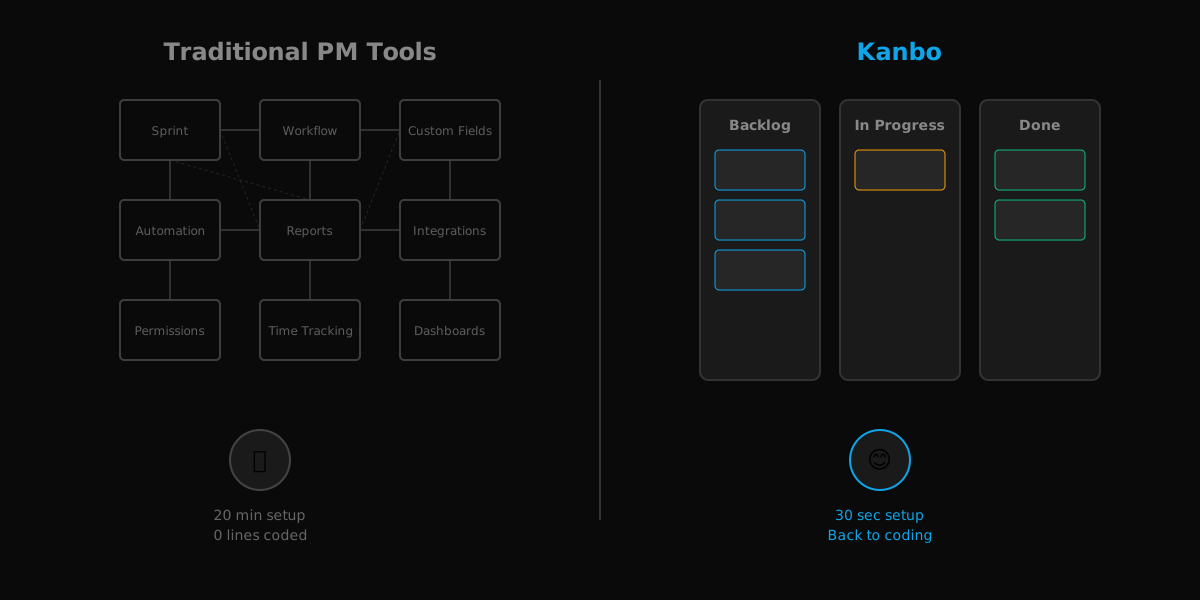
If you're a developer, you've probably felt this pain: you sit down to start your day, fire up Jira (or Linear, or Notion, or Monday.com), and suddenly you're 20 minutes deep into configuring sprint workflows, custom fields, and automation rules—before you've written a single line of code.
We built Kanbo because we were tired of project management tools that felt like second jobs.
The Problem With "Powerful" Tools
Here's the thing about most PM tools: they're built for enterprises. They're designed for organizations with dedicated project managers, scrum masters, and complex workflows spanning dozens of teams.
But what if you're a solo developer? A small team of 3-5 people? A startup moving fast and breaking things?
You don't need:
- Sprint planning ceremonies
- Velocity tracking dashboards
- Customizable workflows with 47 different ticket types
- Integration marketplaces with 500+ apps
You need to answer three questions:
- What needs to be done?
- What's being worked on?
- What's finished?
That's it. That's Kanban in its purest form.
Simple Doesn't Mean Stupid
When we say Kanbo is "dead simple," we don't mean it's feature-poor or dumbed down. We mean it respects your time.
Every feature in Kanbo exists to answer one question: "Does this help developers ship faster?"
Things we kept:
- Drag-and-drop boards (because visual organization works)
- Markdown support (because developers speak markdown)
- File attachments (because context matters)
- Task history (because you need to know what changed and why)
- AI-powered task generation (because breaking down requirements is actual work)
Things we killed:
- Complex role hierarchies (you're either a manager or a member—that's it)
- Mandatory sprint cycles (work flows continuously, not in arbitrary 2-week chunks)
- Custom workflows (configurable statuses, yes; workflow engines, no)
- Time tracking (if you need detailed time tracking, Kanbo probably isn't for you)
- MCP-Native: Your AI Assistant Knows Your Backlog
Here's where it gets interesting.
Most PM tools added AI as an afterthought—a chatbot in the corner that can "summarize your sprint" or "generate ticket descriptions."
We built Kanbo to be MCP-native from day one.
What does that mean? It means Claude (or any MCP-compatible AI assistant) can:
- Read your entire project structure
- Create tickets based on natural language requirements
- Break down complex features into actionable tasks
- Update ticket statuses as you work
- Search your project history semantically
Imagine this workflow:
You: "I need to add user authentication to the app"
Claude: "I'll break that down into tasks:
1. Set up Clerk authentication provider
2. Create protected route middleware
3. Add login/signup UI components
4. Implement session management
5. Add user profile page
Should I create these tickets in your 'Backend Auth' project?"
You: "Yes, and add file upload to the profile page"
Claude: "Added ticket #6: Implement profile picture upload with GCS"
That's not a demo. That's how Kanbo works with Claude Desktop today.
Built for Developers, By a Developer
I'm a solo developer building Kanbo under the Atmanworks brand. I use Kanbo to build Kanbo. If a feature annoys me, I remove it. If something slows me down, I simplify it.
This isn't enterprise software designed by committee. It's a tool built by someone who codes 8 hours a day and has zero patience for bullshit.
The tech stack reflects this philosophy:
- Bun + Elysia (fast, modern, TypeScript-native)
- Next.js 14 (because React Server Components are incredible)
- PostgreSQL (boring technology that works)
- Deployed on Cloud Run and Vercel (serverless, scalable, cheap)
No microservices. No message queues. No Kubernetes. Just clean code that solves real problems.
The Pricing Philosophy
Here's something wild: most PM tools charge $10-15 per user per month. For a team of 5, that's $600-900 per year.
Kanbo Pro is $5/month. Total. Not per user.
Why so cheap? Because our costs are low:
- Serverless architecture means we only pay for what we use
- Efficient AI models (Gemini Flash) keep inference costs minimal
- No sales team, no enterprise support overhead
We're not trying to be a billion-dollar unicorn. We're trying to build a sustainable business around a tool we'd want to use ourselves.
Who Is Kanbo For?
Kanbo is perfect for:
- Solo developers managing multiple projects
- Small teams (2-10 people) who value speed over process
- Developers who prefer markdown and keyboard shortcuts
- Teams using Claude or other AI coding assistants
- Anyone tired of "enterprise-grade" PM tools
Kanbo is NOT for:
- Large organizations needing complex approval workflows
- Teams requiring detailed time tracking and billing
- Companies with compliance requirements for project auditing
- Anyone who loves Gantt charts and resource allocation matrices
What's Next
We're adding:
- Semantic search using vector embeddings (find tickets by meaning, not just keywords)
- AI requirements discovery (paste a PRD, get a full task breakdown)
- Release management (group tickets into releases without sprint ceremony overhead)
- PayloadCMS integration for blog and docs (dogfooding our own stack)
But we'll never add:
- Mandatory workflows that slow you down
- Features that require training videos to understand
- Pricing that punishes team growth
- Complexity for complexity's sake
Try It Yourself
Kanbo is live at kanbo.dev. The community edition is free and self-hostable. Pro is $5/month.
If you're a developer who's ever thought "I just want to track my tasks without learning a new enterprise platform," Kanbo might be for you.
If you're already using Claude Desktop or Cursor, the MCP integration will feel like magic.
And if you hate it? That's fine too. There are plenty of other tools out there. We're not trying to be everything to everyone.
We're just trying to be the simplest, fastest way for developers to manage their work.
Written by Cloud Pg07
February 9, 2026
Comments
Sign in to join the conversation